
Your account, your plan, the interface at a glance, and how to connect GENmarketer. Settings come next.
What is it, in plain words?
Claude is an AI assistant: you write to it like a colleague, and it answers, analyzes, writes text or builds materials. You can use it in the browser at claude.ai, and there are desktop and mobile apps too. On its own it has general knowledge; once you connect GENmarketer, it gets a marketing team and access to your ad accounts.
In short
- The free plan is enough to try things out; for daily work, Pro is more comfortable.
- The menu on the left of this page gives you every topic of the course.
- Connecting GENmarketer takes 2 minutes, and from then on the team does the work.
The interface in 30 seconds
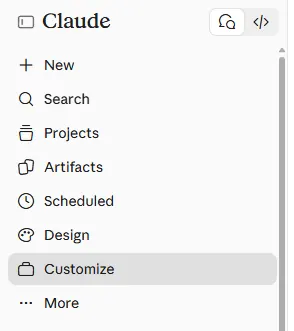
The menu is on the left. Besides your conversations, you will use four items a lot:
Projects
one topic, one workspace
Lesson 5
Customize
connectors and skills
Lessons 6-7
Artifacts, Design
finished materials
Lessons 10-11
Scheduled
tasks that run on their own
Lesson 16
Steps
Choose a plan.
GENmarketer connects on the free plan too, and that is enough to try it. If you use Claude every day, the Pro plan (paid monthly) gives you a bigger allowance, which means you can do more in a day, plus the stronger models, long tasks and Claude Code. Always check prices on claude.ai, because they change.
Connect GENmarketer.
This takes a few clicks: you add a link in Claude’s settings, then sign in to your GENmarketer account. The exact steps, with screenshots, are in the Connect to Claude lesson.
Set up your account.
What Claude should remember about you, what can be used from your conversations, and which ground rules it follows when it answers: the next lesson covers this.
First test
What are the 3 most important things to do in my Meta Ads account, using GENmarketer?You are done when
- you can sign in and see the left menu;
- a GENmarketer specialist is working in the answer to the test prompt.
Next lesson: 2. Useful settings
Sources: Futurepedia: Use Claude Better Than 99% of People (2026-08); Futurepedia: Full Claude Tutorial (2026-04).